
Yesterday images for the next set of Collectable Stat Cards were added to the inventory [1]. I didn’t feel like taking 30 screen shots so I suggested that players view them in the inventory. I know that the vast majority of you don’t care, but I was asked about it. Although the cards were added, the small images are broken links and can not be viewed directly. Some contain the large image but others do not. If you care and want to see them, follow the instructions below.

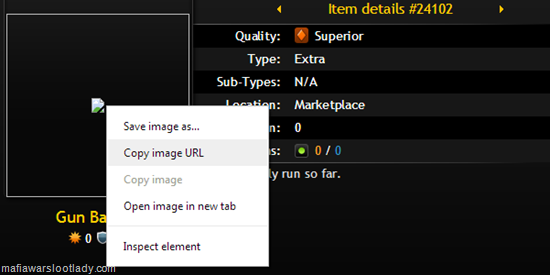
To see the card image, you need to reconstruct the actual card link. The basic Collectable Stat Card image links are shown below. Each series contains 6 cards (5 regular and 1 reward card).
~~Series 1~~
http://zyngapv.hs.llnwd.net/e6/mwfb/graphics/huge_item_XXX1_card1.png
http://zyngapv.hs.llnwd.net/e6/mwfb/graphics/huge_item_XXX1_card2.png
http://zyngapv.hs.llnwd.net/e6/mwfb/graphics/huge_item_XXX1_card3.png
http://zyngapv.hs.llnwd.net/e6/mwfb/graphics/huge_item_XXX1_card4.png
http://zyngapv.hs.llnwd.net/e6/mwfb/graphics/huge_item_XXX1_card5.png
http://zyngapv.hs.llnwd.net/e6/mwfb/graphics/huge_item_XXX1_card6.png
~~Series 2~~
http://zyngapv.hs.llnwd.net/e6/mwfb/graphics/huge_item_XXX2_card1.png
http://zyngapv.hs.llnwd.net/e6/mwfb/graphics/huge_item_XXX2_card2.png
https//zyngapv.hs.llnwd.net/e6/mwfb/graphics/huge_item_XXX2_card3.png
http://zyngapv.hs.llnwd.net/e6/mwfb/graphics/huge_item_XXX2_card4.png
http://zyngapv.hs.llnwd.net/e6/mwfb/graphics/huge_item_XXX2_card5.png
http://zyngapv.hs.llnwd.net/e6/mwfb/graphics/huge_item_XXX2_card6.png
~~Series 3~~
http://zyngapv.hs.llnwd.net/e6/mwfb/graphics/huge_item_XXX3_card1.png
http://zyngapv.hs.llnwd.net/e6/mwfb/graphics/huge_item_XXX3_card2.png
http://zyngapv.hs.llnwd.net/e6/mwfb/graphics/huge_item_XXX3_card3.png
http://zyngapv.hs.llnwd.net/e6/mwfb/graphics/huge_item_XXX3_card4.png
http://zyngapv.hs.llnwd.net/e6/mwfb/graphics/huge_item_XXX3_card5.png
http://zyngapv.hs.llnwd.net/e6/mwfb/graphics/huge_item_XXX3_card6.png
~~Series 4~~
http://zyngapv.hs.llnwd.net/e6/mwfb/graphics/huge_item_XXX4_card1.png
http://zyngapv.hs.llnwd.net/e6/mwfb/graphics/huge_item_XXX4_card2.png
http://zyngapv.hs.llnwd.net/e6/mwfb/graphics/huge_item_XXX4_card3.png
http://zyngapv.hs.llnwd.net/e6/mwfb/graphics/huge_item_XXX4_card4.png
http://zyngapv.hs.llnwd.net/e6/mwfb/graphics/huge_item_XXX4_card5.png
http://zyngapv.hs.llnwd.net/e6/mwfb/graphics/huge_item_XXX4_card6.png
~~Series 5~~
http://zyngapv.hs.llnwd.net/e6/mwfb/graphics/huge_item_XXX5_card1.png
http://zyngapv.hs.llnwd.net/e6/mwfb/graphics/huge_item_XXX5_card2.png
http://zyngapv.hs.llnwd.net/e6/mwfb/graphics/huge_item_XXX5_card3.png
http://zyngapv.hs.llnwd.net/e6/mwfb/graphics/huge_item_XXX5_card4.png
http://zyngapv.hs.llnwd.net/e6/mwfb/graphics/huge_item_XXX5_card5.png
http://zyngapv.hs.llnwd.net/e6/mwfb/graphics/huge_item_XXX5_card6.png
Now take the link of the card you wish to view and add the name to where the XXX is located. Sometimes the abbreviations are used instead of the collection name but it usually doesn’t take long to find. In this case, the entire name is used. For our example card, we will replace the XXX with the word Camouflage. Paste this into your browser bar and hit enter to see the image.


| Set | Image | Set | Image | Set | Image | Set | Image |
| 1 |  |
5 |  |
9 |  |
13 |  |
| 2 |  |
6 |  |
10 |  |
14 |  |
| 3 | |
7 |  |
11 |  |
15 |  |
| 4 | |
8 |  |
12 |  |
16 | |
It’s not an exact pattern but from Set 13 on (when the banners stopped being unique), the colors are aqua, brown, red, blue, green, etc.. If you follow the sequence, you can guess that the next banner will be green and the one after that purple.


Thanks. That was easy to follow. (I didn't care about seeing the card image, but I wanted to learn how you do it)
ReplyDelete