
I’ve been asked on several occasions to post instructions for using the Expert Mode on the Gift Blaster by Team Spockholm. With many upgrading the London Citadel, this is the perfect time to utilize it. The expert mode simply give the user a way to blast out a variety of gifts in the same run. The good news is you don’t need to be an expert to use it. It’s very simple! The first step is to activate the Gift Blaster. Find it in your Spockholm Toolbar or use the stand alone version which can be found on the Spockholm Mafia Tools Page.

The London Citadel requires 5 unique upgrade parts and will be used as an example. To use the Expert Mode, follow the instructions below.
1. Once activated, click on the “expert mode” link which is located to the right of the “Select Gift” drop down menu. A green plus sign will appear.


2. Click on the down arrow to open up the menu.

3. Scroll midway until you locate the London upgrade parts, select one of them and click enter.


4. Click on the green plus sign and your first gift will be added with a percentage adjuster next to it.

5. Repeat steps 2 through 4 with the gifts of your choice. For this example, all 5 upgrade parts were added.

6. Now adjust the percentage to anything you want and ensure they add up to 100. I chose 20% for each gift so I would get a close to equal return rate (you can’t control who returns your gifts but it should be close to the percentages you choose).

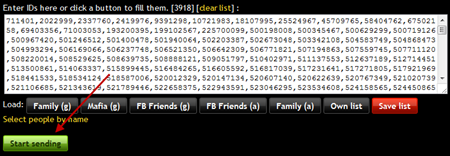
7. Load the list of your choice. To get the most returns, select the “FB Friends (a)” button. If your gift is accepted by someone who hasn’t joined your mafia yet, this will automatically add them.

8. Wait a few seconds for your list to load. All the Facebook ID#’s of the people in your select list will appear.

9. Click the “Start sending” button and wait for the Gift Blaster to do it’s thing. It will send one gift to each person on your list. If you used the expert mode properly, it will send the proper percentages of the gifts you chose.
10. Wait a while and return to your ZMC. It should be full of return gifts from your mafia. Use the Gift Collector to make accepting them all much easier!

If you prefer to send your gifts manually, you won’t find London upgrade parts on the Free Gift Page. Use the spockon.me links below to access each send page. Bookmark them for future access.


Thank you so much :)
ReplyDeleteYou can do the same without expert mode. Load as per usual. Select gift, let it run until you hit eg 10%, ie 500 persons out of 5,000, select the next gift and click send again. Gift Blaster will automatically start sending the new gift. Rinse repeat. This also allows you to change your mind - more or lesser percentage of a gift, or you decide you want to send other stuff too, like artillery, concrete, m bags, etc.
ReplyDeleteRon
umm, why not just decide what you want to send and in what percent, set them up with blaster expert mode and then let it run versus baby sit it.
ReplyDeleteI either have an intent in mind like London parts or else I just want more gift bags and special parts - either way expert mode lets it just run
now one thing I do first is send the family property part, like concrete, to only my family first, and then send out the big blast
exactly
Deletegood job on explaining it to every one
Deletespockon.me links for London parts didnt work for me anymore. But thanks for Gift Blaster info :)
DeleteSpockholm London property links no longer work for me.
ReplyDeleteThe London Parts link was working previously, but not today.
ReplyDeleteWhen the gift blaster first came with the expert mode the post said to experiment and figure it out. So I did and it was real easy to figure out.
ReplyDeleteCan someone tell me how to send mulitples of the same item to myself from my mini? I've tried copying my FB ID multiple times but it never works. I've talked to other ppl and they said sometimess it works sometimes it doesn't. What am I missing????
ReplyDeleteThe Spock links for parts are no longer bringing up the gift page.
ReplyDeleteTo all, the London Parts links no longer work because they load into an unframed game window, and unframing was broken by Zynga. There is a work around for unframing (see other blog posts) but this will not help those links because they reload the page.
ReplyDelete~Karmakula
I've been using the parts links above since they were posted-- starting day before yesterday there was an issue -- when I used them it brought up the gift window and the list of names, and looked normal, but gifts were never actually sent (or received). anyone know of a solution except using gift blaster? Is gift blaster still working?
ReplyDeletestill works?
ReplyDeleteDoes anybody know the difference between (a) and (g) on the friends tabs?
ReplyDelete(a)is everybody in that catefory (g)is everybody in that category that comes up on gifting page... i always use a
ReplyDeleteDoes anyone know how to send multiple gifts to friends? Example, a mw player was sending me 50 of the poker cards a day but he doesnt speak English so that didnt go very far. Any help will be Greatly appreciated.
ReplyDeleteI have followed the above but it is not working, it says " Done, all sent. and You have sent 0 request... Please help me, thank you
ReplyDeletei understand that it allegedly supposed to be a helpful app. it seems to be working on april 01, only. are you comedians, because in spite of following your instructions, nothing works.
ReplyDeleteI can''t get it work anymore....... :(
ReplyDeleteIts brilliant. learn to drive it.
ReplyDeleteThis has stopped working for me the last few weeks. Anyone figure out an update for it?
ReplyDelete