Jun 30, 2010

Review: How To Get Las Vegas Consumables

Share:
There seems to be a lot of confusion on how to get all 5 of the Las Vegas Consumable items.  If you have no idea what I'm talking about, read the first article I wrote about this located at the bottom of this one.  It's actually easy.  You will need 2 of each item to build your Las Vegas Casino.  This is about all we know.  You get the items by going through your news feeds and clicking on one of these posts.  You will receive one of the 5 items you need.  This one item is type specific for your account.  To get the other consumables, you need to add them to your wishlist and beg or trade for the other four items you need.    
If you don't feel like going through these posts, use the Stream Helper Bookmarklet by Team Spockholm.  Read This Article to learn how to use Stream Helper in general. You need to click on the "Crew Jobs" option and it will find all the posts for you.  When you get your list, click on the word "Casino" to collect your item.  You can only collect ten of these.  When you get 10, go out and search for 2 of each item that you don't have.

Here is a copy of my original article for review.  Click on the names of the items you need to add them to your wishlist.  Make sure you have vacant spots or this won't work. 
_____________________________________________
Las Vegas Loot Event is also giving us a chance to collect consumable items that Zynga says "You'll need it in Las Vegas to contstruct our own Casino Vault".  To get these items, scroll through your news feeds and look for posts like the one below and click on "Claim your Vegas Reward".  You can accept one per family member and have a maximum of 10 of each item.  It is not known if the limit is ten per day or ten total.  These items are giftable and can be added to your wishlist.  I find it interesting that Zynga finally introduces new items that are giftable but they put a cap on the number you can have.  I'm sure we will being seeing a lot more of this type of thing.


To keep up with changes or additions check the Mafia Wars Wiki Las Vegas Loot Event Page everyday.
The following graphics are from this Mafia Wars Wiki Page.  Click on the item name to add it to your wishlist.
 

Game Design Changes

Share:
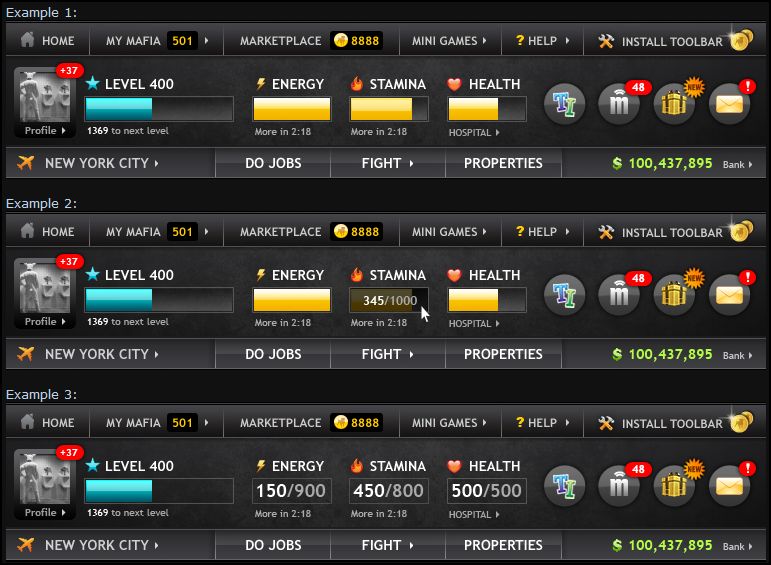
Zynga didn't waste any time.  Within 24 hours of asking us which design we preferred for the new game header, there are reports of new accounts having a new look already.  I broke into my brothers Facebook account and signed him up for Mafia Wars.  Here is what his header looks like.  A great article to read to get more information on the changes made to new accounts is New York For New Players! by The Mafia Wars Maniac.  She has lots of great screen shots to look at.  Also read the this article if you want to learn about the new crappy loot items available in New York.
My Brothers New MW Account
My Account

New Bangkok Exp/Energy Ratios

Share:
I was so happy to learn that the experience/energy ratios for Bangkok jobs have greatly improved.  This is just awesome and will help me enjoy the game more.  To see what the new ratios are for all the jobs, use Exp/Energy2.0 by Joyka.  If you don't know how to use this program, read my article titled Joyka Does Mafia Wars Math For You.  Here are some screen shots from my game.  I haven't completed the last two episodes so the numbers may be different if you have.  The exp/energy ratios can be seen in parenthesis below the experience pay out. 
Episode5B
Episode6
Episode 7
It will be so nice to have the option of doing Bangkok jobs when I want to utilize my energy to level quicker.  I don't know about you, but I was getting tired of the job below which has a exp/energy ratio of 2.114.  You can only settle so many beefs permanently.  Episode 7 "Battle Your Way Through The Temple" now has the games best exp/energy ratio of 2.12.  Thank you Steve Kirkbride for letting us know this important statistic.
Thank you Zynga, you have finally done something good for your players.  I'm sending some love your way.  Please do things like this more often and your stats will get better.

Jun 29, 2010

Zynga Customer Support: Top 5 Problems

Share:
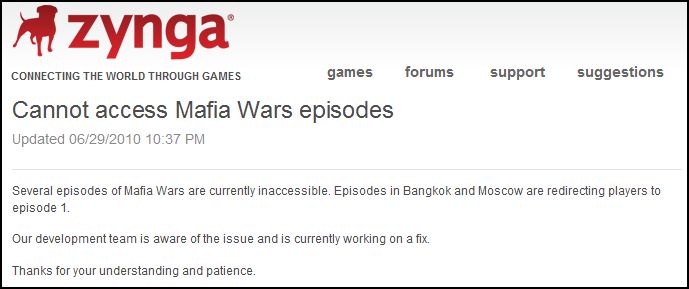
There are a few problems with Mafia Wars tonight.  I went to the Zynga Customer Support Page to look for some answers.  Here are the top 5 asked about problems and Zyngas answers.  Click on images to enlarge.

Mafia Wars Statistics

Share:
I'm sorry Zynga but Mafia Wars in and of itself is kind of boring.  What makes it fun are the communities that have stemmed because of the game.  Some of these communities include The Clans, The Traders, and The Script Users.  Zynga and Facebook are doing everything they can to complicate the foundations of these communities.  The Clans encounter problems because they make too many posts and post links for people to attack on their profile and war pages.  The Traders are having issues with delays in gifting and rumors of gifting limitations.  The Script Writers have trouble every time a change is made to the game and have to rewrite the scripts.  It's as if Zynga would like these communities to disappear.
I get very sad when I see messages from good friends and players announcing they are quitting the game.  My friend Kimberly Miller, an active fighter and very high level Mafia Wars player lost her Facebook account. It's believed that this was because of posting links on her wall for her mafia members to attack.  A few of my clan friends have had their accounts temporarily suspended because they made too many icing posts in a 24 hour time frame.  Things look good for Kimberly and her account should soon be reinstated but I'm sure this was a stressful experience.  My friend Josh Flores, a formerly active trader, wrote an excellent note detailing his reasons for laying off Mafia Wars and explaining why he now plays Superhero City (a non-Zynga game).  Click HERE to read his note.  Pete from The Spockholm Mafia Tools Fan Page made the following post and you can just feel the frustration he is experiencing.  He makes a valid point.  I sure don't want to be a "Click Monkey"
I don't understand how a script is written or what has to be done when the game changes but this will probably cause some problems for all of us.  Is this change really necessary?  If it's not broke, please don't attempt to fix it.  There are plenty of game elements that ARE broken and need to be fixed!  If you would like to add your 2 cents to this Zynga Forum Thread, click HERE.
I've also seen many players trying to sell their accounts.  Do theses guys sense a mass exodus coming in the near future?
I know this kind of stuff isn't just happening in my Mafia.  I love to review statistics and have found a few good sites that track the ones involved with Facebook Applications.  Thanks goes to the The Daily Post for bringing these sites to my attention.  You don't need to be a brilliant statistician to read the graphs and can visit the sites below anytime to get the most up to date information.  I've written about Mafia Wars Application Statistics in the past and they continue to drop.  The following graphs represent the data as of June 29, 2010. Ignore the giant dip in the all the graphs as it simply represents a point in time that no data was gathered and was entered as zero.  The first group comes from Facebreakers.
The Past 6 Months
The Past Month
 The Past 2 Weeks
The Past Week

The next group of graphs comes from All Facebook and shows the same pattern of decline.
Monthly Users
Weekly Users
Daily Users

This list below from All Facebook is interesting.  More people are playing Cafe World than Mafia Wars.  You can see here that Mafia Wars is no longer a growing application.  Many players are leaving and Zynga continues to do things to perpetuate the decline in active daily and monthly users.
If I quit playing Mafia Wars, I will go back to the games I used to play before I even had a Facebook Account.  I don't recall a time I ever worried about losing my accounts, my rankings, or finding the games I liked had changed.  Here are my Avatars for Pogo and Full Tilt Poker.

Jun 28, 2010

Zynga Live Chat

Share:
UPDATE:  The Live Chat feature is no longer present 24/7.  When it's available, the steps below will apply.  When it's not, there will be no option for it on The Customer Support page.  There are no set times so you need to keep checking until it's there.  It's not always on the same page so you need to navigate around Customer Support and look for the first image shown below.

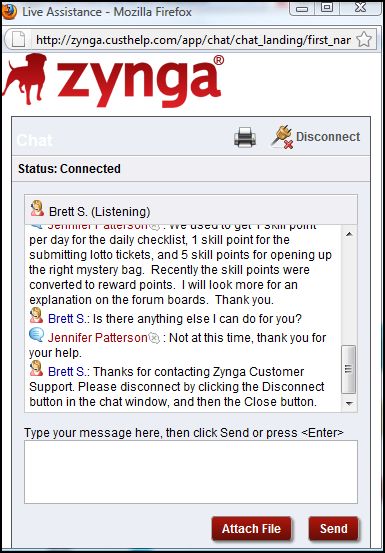
I didn't put much thought into trying out the new Live Chat feature and had to come up with a random problem pretty fast.  I was surprised by how quickly I was connected with a Customer Service Representative.  Since Zynga has turned into Skill Point Fascists, I wanted to find out if the number of skill points we can receive from mystery bags has changed.  I heard a rumor that you now get 1 to 5 instead of 5 every time skill points are rewarded from mystery bags. I also asked him why Zynga doesn't want us to have so many skill points.  I already knew the answer to this question but wanted to add some substance to my chat session.  Here is a walk through of my experience and how you can use this feature too.

1.  Go to the Zynga Customer Support Page and click on "Chat Now".
 2.  Fill out the chat request form and click "Submit Request"
3.  Type in your problem or question.  Within seconds, I was connected with a Zynga Customer Support Representative named Brett S.
4.  Disconnect.  When the chat session was over, Brett asked me to click on the "Disconnect" button to end it.  Didn't he know I needed to take some screen shots first?
5.  Wait for your confirmation e-mail.  Within minutes of disconnecting, I received an e-mail containing a complete transcript of the conversation.  It's also set up so the e-mail is now a support ticket.  If I want to keep bugging Zynga, I can respond to this e-mail.
I'm not satisfied with the answer Brett gave me but it was obvious he didn't know or was confused as to what I was asking him.  I'm trying to find out if the +5 skill point reward is available from the mystery bags or has it been changed to either +1, +2, +3, +4, OR +5.  I can't find a definitive answer.  Did Zynga hire this guy to be in charge of their Skill Point Allocation Department?
(original image owned by Sony Pictures)

Repeat Job: Team Spockholm

Share:
I got the following message from my friend Karin Schmidt the creator of Karin's Combat Arena.  Karin's Combat Arena is a group used by many clan members to have mock wars and get useful information.  If you join, you will also get "Karin's Tips" sent right to your inbox.  I was happy to get this message because it reminded me that I need to get my 7 Las Vegas Loot items.  
I decided to take Karin's advice.  I went to The Associate Job Tier in NY and chose the job "Mugging" which costs 2 energy points a click.  After about 10 or so clicks, I got really bored and decided it was a good time to bust out The RepeatJob Bookmarklet by Team Spockholm.  I was able to get all four of the Las Vegas Loot items that are dropped when doing jobs!  To learn how to use RepeatJob Beta and see my results, keep reading.

1.  Go to the Spockholm Maifia Tools Beta Page and locate "RepeatJob Beta".  Beta bookmarklets simply mean that they change a lot because of the changes made by Zynga.  You don't need to delete and re-add Beta bookmarklets whenever changes are made.
2.  Click, drag and drop "RepeatJob Beta" into your bookmark tool bar.  Read these articles if you don't understand how to install bookmarklets (1),(2).
3.  Go to your Mafia Wars game and unframe it.  Read the articles above if you're not sure what unframing means.  You can find the UnFrameMW Bookmarklet on the Spockholm Mafia Tools Stable Page.  Follow step 2 to install this bookmarklet as well.  Click UnFrameMW once to unframe the game and click on it a second time to get the scroll bars back.
4.  Go to the job you wish to repeat and do it once.  I chose Mugger and will use it in this example.  Once the job is performed and you have the first screen, go to your bookmark tool bar and click on RepeatJob Beta once.  Your game will now look like the second screen shot.
5.  Adjust the settings.  It will start running automatically if you don't pause it to adjust the settings.
Jobs done:  Enter the number of jobs you want to do.  Keep it at zero and it will go until you run out of energy.
Pause on Ratio:  You can set the program to stop running when you reach a certain experience/energy ratio, experience/stamina ratio or a certain amount of energy remaining before you level up.  I don't know how to calculate all that stuff and just keep everything at zero.  Maybe someone smart can comment to elaborate on this.
Continue or Stop on an event:  Click on the yellow continue or stop to change.
Showing or Hiding items:  Click on either of these to change.  If you choose hiding, the items you gain will not show up.
Delay:  Spockholm recommends a delay of 2 to 4 seconds between jobs to deter detection of script use by Zynga.  I encourage this too but on my energy accounts, I go all out.  I even use an auto clicker and point it on the little green arrow to make it do jobs super fast.  I know this is bad but I can't help myself.  I don't like to wait for anything.  If you don't know how to use a auto clicker, click HERE to read about the one I use.  I love my auto clicker and use it for many things.
Showing or Hiding Log: Click on either of these to change.  If you choose hiding than the log won't show up on your screen. 
6.  Remember to click the start button.  If you walk away and come back to find nothing has happened, this is probably why.  The rule I have learned with computers is if something doesn't work, it's probably you and not the program.  I've encountered many problems and know this rule well.
7.  Review your data when the run is finished.  This is the fun part.
Jobs done:  This will tell you how many jobs were performed.
Stats:  This will tell you how much experience you gained and how much money you made.
Top Mafia:  This will tell you how many jobs and the percentage of total jobs done that you received a Top Mafia Bonuses.
Loot:  This will tell you how many loot items you received and the percentage of jobs dropping loot of the total numbers of jobs performed. It will also list every type of loot item you received and how many of each.

I kind of messed up here.  I set RepeatJob to run on "Mugging" and forgot to tell it to pause after a hundred or so jobs.  I was distracted by real life and forgot it was running.  I was a little bit mad at myself when I realized it was still running.  You can see I ran the mugging job 1,457 times.  I did get all the Las Vegas Loot I needed but I also wasted 1,457 Boosted Smoothies and Money Socks on a 2 energy point job!  I'm not thrilled about the 1,159 Butterfly Knifes either.  OOPS!   At least I got the Jackpot so I don't feel too bad for being such a ditz.  

8.  For additional help, click on Help and you will be directed to the Spockholm Mafia Tools Help Page.  To keep up with updates of this and all the other bookmarklets written by Team Spockholm visit the The Spockholm Mafia Tools Fan Page to read posts made by Martin and Peter and fan discussions.  If your wondering what Pintware means, you can click on this to donate to Team Spockholm for all the hard work they do.  They enjoy writing scripts and helping people. If you are able to help out so they can keep their site going, a donation is always appreciated.  When you are all finished, click on the little red octagon with the X  in it to remove the program and stay out of frame.